JavaScript Runtime
JavaScript Runtime is the environment in which JavaScript code runs.
In a browser, the JavaScript runtime is made up of:
- JavaScript Engine
- Browser Capabilities
- Browser Web APIs
- Queues
- Event Loop
JavaScript by itself is:
- Single-threaded
- Synchronous by default
Asynchronous behavior comes from the browser runtime, not from JavaScript itself.
JavaScript Engine
The JavaScript Engine is responsible for executing JavaScript code.
Examples: V8 (Chrome), JavaScriptCore / JSC (Safari), Chakra (Legacy browsers like Internet Explorer)
It contains two main components:
Memory Heap
- Stores variables, objects, and functions
Call Stack
- Executes JavaScript code
- Follows Last In, First Out (LIFO) order
- Only one piece of code executes at a time
Example
const user = {
  name: "Vasanth",
  age: 35
};
What happens?
Stack                    Heap
-----                    ----
user  ------------->     {
                            name: "Vasanth",
                            age: 35
                         }
The JavaScript heap is a region of RAM used by the JavaScript engine for dynamic memory allocation. Objects, arrays, functions, and closures are typically stored there, while variables on the stack usually hold references to those heap objects.
Call Stack Execution
The call stack manages function execution order.
function a() {
  b();
}

function b() {
  console.log("Hello");
}

a();
Execution flow:
a()is pushed onto the stackb()is pushed onto the stackconsole.log()executes- Functions complete and are popped off the stack
Browser Web APIs
Browsers provide additional capabilities to JavaScript through Web APIs.
Common Web APIs include:
setTimeoutsetIntervalfetch- DOM events
- Geolocation
- Web Storage
The JS engine hands work off to these Web APIs for both synchronous and asynchronous operations. Not every Web API is asynchronous, and not every Web API call goes through a queue.
Synchronous Web APIs
Some Web APIs, like localStorage and sessionStorage, are synchronous. The engine calls into the browser, the browser does the work, and the result is returned directly. The call stack waits until it finishes, and no queue is involved.
console.log("Before");

localStorage.setItem("theme", "dark");
const theme = localStorage.getItem("theme");
console.log(theme);

console.log("After");
Output:
Before
dark
After
Execution flow:
localStorage.setItemis handed to the browser's storage API- The call stack waits until the value is written
getItemreturns the value immediately, so the next line can use it- No callback, no queue, no event loop involvement
Asynchronous Web APIs
Other Web APIs, like setTimeout, fetch and DOM events, are asynchronous. The browser does the work in the background, JavaScript keeps running, and the callback is placed into a queue when the work completes.
setTimeout(() => {
  console.log("Hello");
}, 2000);
Execution flow:
- JavaScript registers the timer
- Browser Web API handles the timer
- JavaScript continues running without waiting
- After 2 seconds, the callback is pushed into the Macrotask queue
Task Queues
When asynchronous Web APIs complete their work, their callbacks are placed into queues. Synchronous Web APIs (like localStorage) return directly and never use these queues.
Microtask Queue
Higher priority queue.
- Contains:
Promise.thenasync/awaitqueueMicrotaskMutationObserver
queueMicrotask Example
queueMicrotask lets you schedule a callback directly in the Microtask queue.
console.log("Start");

queueMicrotask(() => {
  console.log("Microtask");
});

console.log("End");
Output:
Start
End
Microtask
Execution flow:
Startis logged- The callback is added to the Microtask queue
Endis logged- Call stack becomes empty
- Microtask queue executes →
Microtask
MutationObserver Example
Imagine a third-party chat widget injects a button into the page. You don't know when it will appear.
<div id="chat-widget"></div>const observer = new MutationObserver(() => {
const button = document.querySelector(".chat-button");
if (button) {
console.log("Chat button appeared");
}
});
observer.observe(document.body, {
childList: true,
subtree: true
});Macrotask Queue
Lower priority queue.
- Contains:
setTimeoutsetInterval- DOM events (click, mousedown, mouseup, scroll etc.)
Microtasks are always executed before Macrotasks.
Event Loop
The event loop is a scheduler. It continuously checks whether the call stack is empty and, when it is, picks the next callback from the queues and hands it to the JavaScript engine. The engine then pushes that callback onto the call stack and executes it.
The event loop never pushes anything onto the call stack itself, and it never executes JavaScript. It only decides what runs next and when.
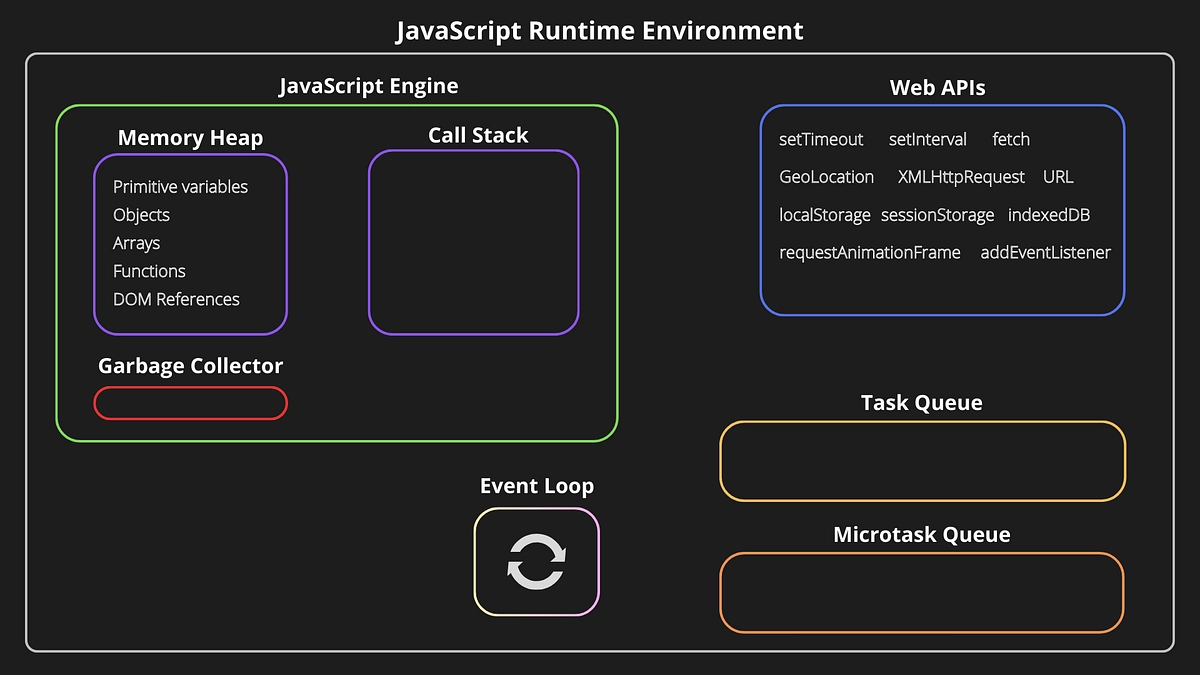
Execution order:
- Wait until the call stack is empty
- Run all Microtasks (including any new ones queued while draining)
- Run one Macrotask
- Repeat the cycle
Each "run" above means the event loop hands the callback to the JS engine, and the engine pushes it onto the call stack and executes it.
Analogy: a doctor's clinic
- Event loop = receptionist. Watches whether the doctor is free and calls the next patient. Urgent patients (microtasks) always go before regular appointments (macrotasks).
- JS engine = doctor. Brings the patient into the cabin and treats them.
- Call stack = the doctor's cabin. Only the doctor works inside it; the receptionist never treats anyone.
Many popular explanations say "the event loop pushes the callback onto the call stack". That is a useful first mental model, but technically the event loop only schedules; the engine does the pushing and executing.
Complete Execution Example
console.log("A");

setTimeout(() => {
  console.log("B");
}, 0);

Promise.resolve().then(() => {
  console.log("C");
});

console.log("D");
Execution order:
Ais loggedsetTimeoutcallback is registered with Web API- Promise callback is added to Microtask queue
Dis logged- Call stack becomes empty
- Microtask queue executes →
C - Macrotask queue executes →
B
Final Output:
A
D
C
B
Event Loop vs JS Engine (V8)
The event loop is a browser-side scheduler that coordinates when the JavaScript engine can execute queued callbacks.
| Aspect | JS Engine (V8) | Event Loop |
|---|---|---|
| Location | Inside JS runtime engine | Inside browser runtime |
| Language | C++ (executes JS semantics) | Native browser code (C / C++) |
| Responsibility | Executes JavaScript | Schedules JavaScript |
| Owns Call Stack | ✅ Yes | ❌ No |
| Pushes callbacks onto Call Stack | ✅ Yes | ❌ No (hands them to the engine) |
| Executes JS | ✅ Yes | ❌ No |
| Controls timing | ❌ No | ✅ Yes |
Why doesn't the JS Engine include the Event Loop?
Because JavaScript is designed to be host-agnostic.
The same JS engine can run in:
- Browser
- Node.js
- Deno
- Embedded systems
Each environment provides its own APIs and its own event loop implementation.
- Browser Event Loop ≠ Node.js Event Loop
- V8 is reused, but the event loop is replaced
Key Takeaways
- JavaScript executes code using a single call stack
- The JS engine hands both synchronous (e.g.
localStorage,sessionStorage) and asynchronous (e.g.setTimeout,fetch) work to browser Web APIs - Only callbacks from asynchronous Web APIs go into the queues
- Microtasks have higher priority than Macrotasks
- Event loop decides execution order
setTimeout(0)does not mean immediate execution- JavaScript is single-threaded and synchronous by default — the browser runtime enables asynchronous behavior